Do you have an old manual birth certificate and want to obtain a digital copy? The Government of India’s Civil Registration System (CRS) portal provides an online facility for submitting eligible old birth records for digitisation, subject to verification and approval by the concerned registration authority.
If you are searching for online birth certificate services in India, or want to know how to apply for a digital birth certificate using an existing paper-based certificate, this guide will walk you through the process.
In this article, we explain how to apply for digitisation of an old manual birth certificate through the official CRS portal at dc.crsorgi.gov.in. The guide covers the step by step process of registering on the portal, uploading necessary documents, submitting your application and tracking its status.
Table of Contents
What Is the CRS Portal?
The Civil Registration System (CRS) portal is an online platform associated with the registration and management of birth and death records in India. It provides access to various civil registration services for eligible users. For individuals who already possess an old manual birth certificate, the portal includes an option called Add Old Birth Event, which can be used to submit an existing birth record for digitisation.
Digitisation helps transfer eligible paper-based records into the digital civil registration system, subject to the applicable verification process.
Important: This article focuses specifically on applying for digitisation of an existing manual birth certificate. It does not cover new birth registration or downloading a certificate that is already available digitally.
Documents Required Before You Apply
Before starting the online birth certificate application, make sure you have the following items ready:
- Old birth certificate: A clear scanned copy or photograph of your existing manual birth certificate.
- Signature: Sign on a plain sheet of paper and take a clear photograph or scan of your signature.
You should also keep your registered mobile phone with you because OTP (One-Time Password) verification may be required during login and application submission.
Preparing these items in advance will help you complete the application without unnecessary interruptions.
Step 1: Visit the Official CRS Portal
Open your web browser and visit the official CRS portal. Once the website opens:
- Click on Login in the top-right corner.
- Select General Public from the menu.
You will be directed to the login or registration interface for public users.
Step 2: Register or Log In to the Portal
If you are using the CRS portal for the first time, you will need to create an account.
For first-time users
- Select the sign-up or registration option.
- Enter your mobile number or email ID and the other required details.
- Complete the registration process as instructed on the portal.
For existing users
If you have already registered, proceed to log in using your registered mobile number.
An OTP will be sent to your mobile phone for verification. Enter the OTP to complete the login process.
After successful login, you will be taken to the portal’s home page.
Step 3: Upload Your Signature Before Starting the Application
This is an important step that can save you time and prevent you from having to fill in the application again.
If your signature has not been uploaded to your profile, the portal may ask you to upload it while submitting the application. If your progress is not saved when you leave the form to update your signature, you may have to start the application again.
To avoid this, upload your signature before beginning the birth certificate digitisation process.
Follow these steps:
- Click on your profile option in the top-right corner.
- Select Update Profile.
- Scroll down to the signature section.
- Upload the image of your signature.
- Save or update your profile, if prompted.
Once your signature has been uploaded successfully, return to the home page.
Remember: Completing this step first can save you time and effort later.
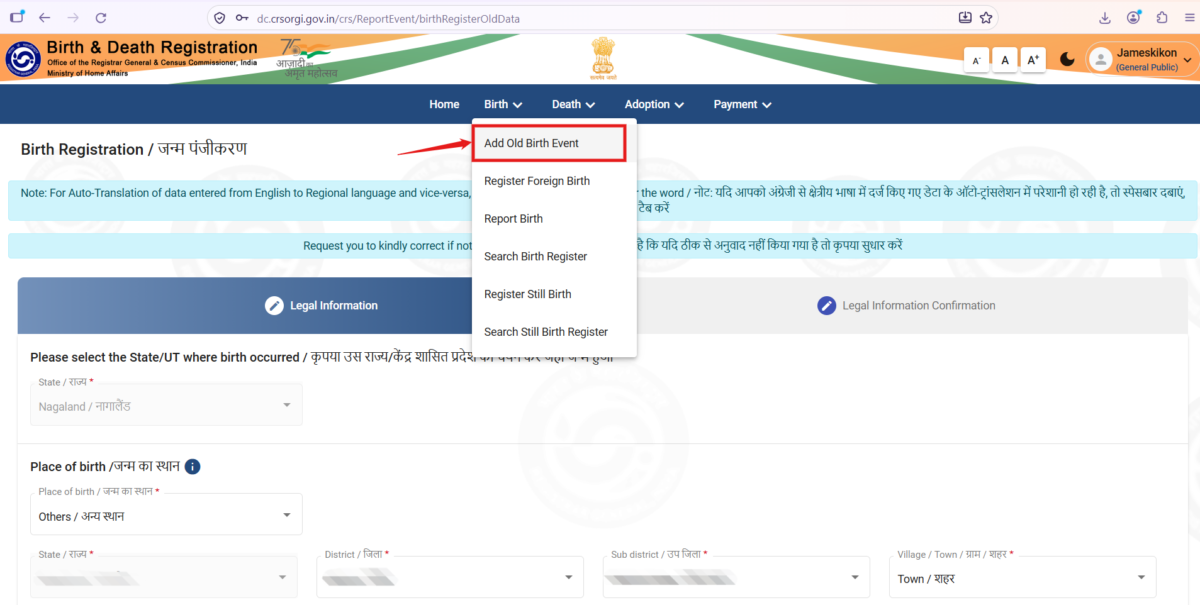
Step 4: Select “Add Old Birth Event”
After uploading your signature, you can begin the application for digitisation of your old manual birth certificate.
- Click on the Births menu at the top of the portal.
- Select Add Old Birth Event.
This option allows you to submit the details of an existing birth record through the relevant application workflow. The process described here is for digitising an old birth record, not for registering a new birth.
Step 5: Fill In the Required Birth Details
After selecting Add Old Birth Event, the portal will display a form requesting the relevant legal and birth-related information.
Enter the required details carefully, referring to your old manual birth certificate. Before proceeding, check the following:
- Name and spelling
- Date of birth
- Place of birth details
- Registration number (as it is on the old birth certificate)
- Other particulars requested in the form.
- Accuracy and consistency of the information entered.
Make sure the information matches your existing birth certificate. Accurate information is important because the submitted application may be checked against the relevant records before approval.
Step 6: Upload Your Old Manual Birth Certificate
After completing the required information:
- Upload a clear scanned copy or photograph of your old manual birth certificate in the designated section.
- Check that the document is readable and complete.
- Ensure that the important details are not cut off or obscured.
- Click Next to proceed.
Before moving to the next stage, verify that you have uploaded the correct document.
Step 7: Review and Submit Your Application
After clicking Next, the portal will display the information you have entered for confirmation. Carefully review all the details before submitting your application.
Check that:
- All required fields have been completed.
- The information matches your old manual birth certificate.
- The correct certificate has been uploaded.
- Your signature has already been uploaded to your profile.
If everything is correct, proceed with submission. An OTP would be sent to your registered mobile number during this stage. Enter it as instructed by the portal to complete the verification process.
Once the submission is successful, your application will be available for further processing by the concerned registration authority.
Step 8: Check Your Application Confirmation Email
After successful submission, you should receive an email confirming that your application has been submitted. The email subject will be similar to:
“Birth Application Submitted Birth (Reference No- XXXXXXXXXXXX)”
Keep this email safe. The reference number can help you identify your application when checking its status or following up with the concerned authority.
Remember that receiving a submission confirmation does not mean that your application has been approved.
Step 9: Track Your Birth Certificate Application Status
After submitting your application, you can monitor its progress through the CRS portal.
Follow these steps:
- Log in to the CRS portal.
- Go to the Home menu.
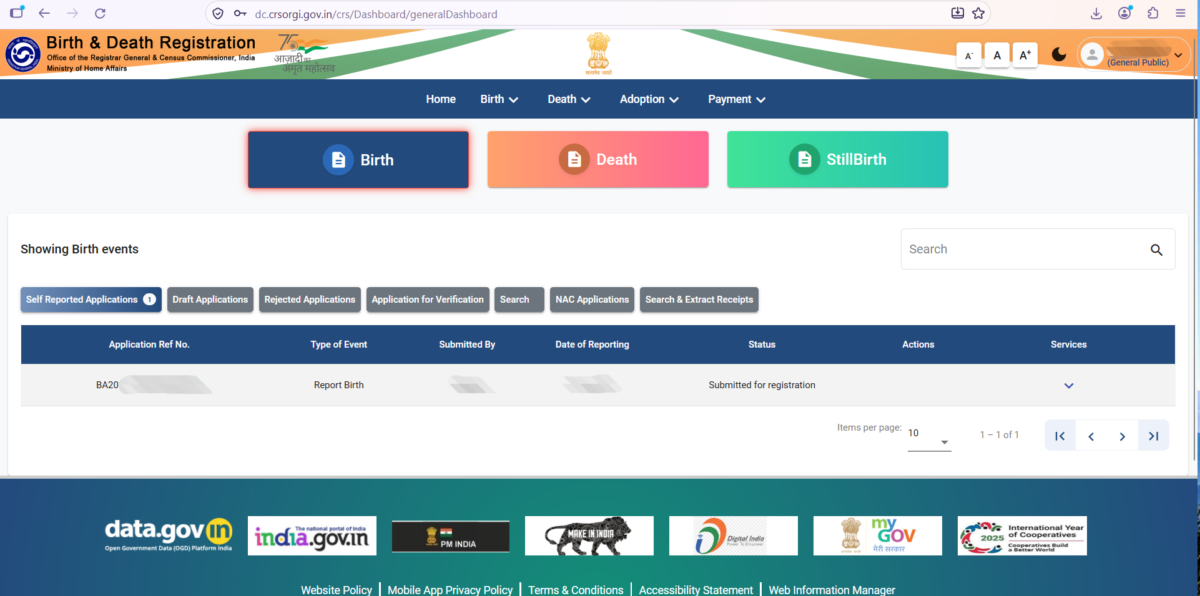
- Look for the section labelled Showing Birth events.
- Click on Self Reported Applications.
- Locate your application and check its current status.
If you have just submitted your application, the status may show: “Submitted for registration”. Check the portal periodically for status updates.
Step 10: Receive Your Digital Birth Certificate After Approval
After the application has been examined and approved by the concerned Registrar, you will receive a notification and/or a soft copy of the birth certificate through the contact details provided, depending on the applicable service process.
The time required for approval may vary depending on verification requirements and the processing of the application by the concerned authority.
If your application remains pending for an extended period, or if additional information is requested, contact the concerned registration authority for assistance. You may also visit the registration office.
Frequently Asked Questions (FAQs)
1. Where can I apply online for digitisation of an old birth certificate in India?
You can visit the official CRS portal at https://dc.crsorgi.gov.in/ and select Login → General Public to access the relevant services.
2. How do I apply for a digital birth certificate using an old manual birth certificate?
Log in to the CRS portal, upload your signature through Update Profile, select Births → Add Old Birth Event, enter the required details, upload your old manual birth certificate and submit the application.
3. What documents are required for the online birth certificate application?
For the process described in this guide, keep a scanned copy or photograph of your old manual birth certificate and an image of your signature ready. Follow any
Related Searches
Online birth certificate in India | Digital birth certificate | CRS portal | CRS birth certificate application | Birth certificate online apply | Digitisation of old manual birth certificate | Add Old Birth Event CRS portal | Birth certificate application status


Leave a Comment (FB)